What Is Skip Logic in Surveys and How Do You Use It?

Samee
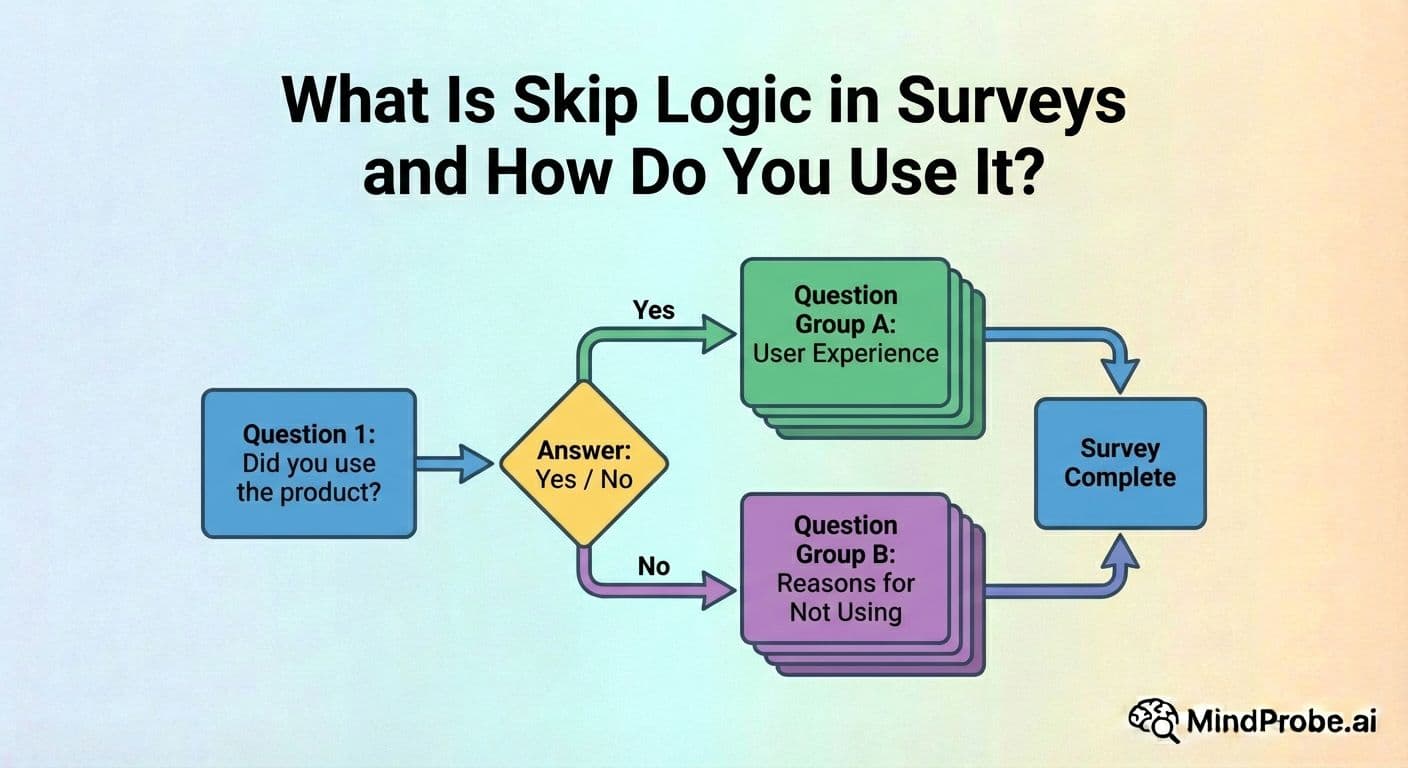
Skip logic routes respondents past questions that do not apply to them. It makes surveys shorter, more relevant and produces cleaner data. Here is how to use it and the mistakes to avoid.
Not every respondent needs to see every question. That is the fundamental idea behind skip logic, and it is one of the most useful features in any survey tool. Despite this, it is underused by a surprising number of teams, often because it sounds more technical than it actually is.
Skip logic (also called conditional branching, survey logic or branching logic) routes respondents to different questions based on their answers. It makes surveys shorter, more relevant and more respectful of people's time. Here is how it works, when to use it, the mistakes that trip up most teams, and a practical planning approach you can use for your next survey.
Key takeaway: Skip logic routes respondents past irrelevant questions based on their previous answers. It reduces effective survey length, improves data quality and increases completion rates without sacrificing the information you need.
How skip logic works
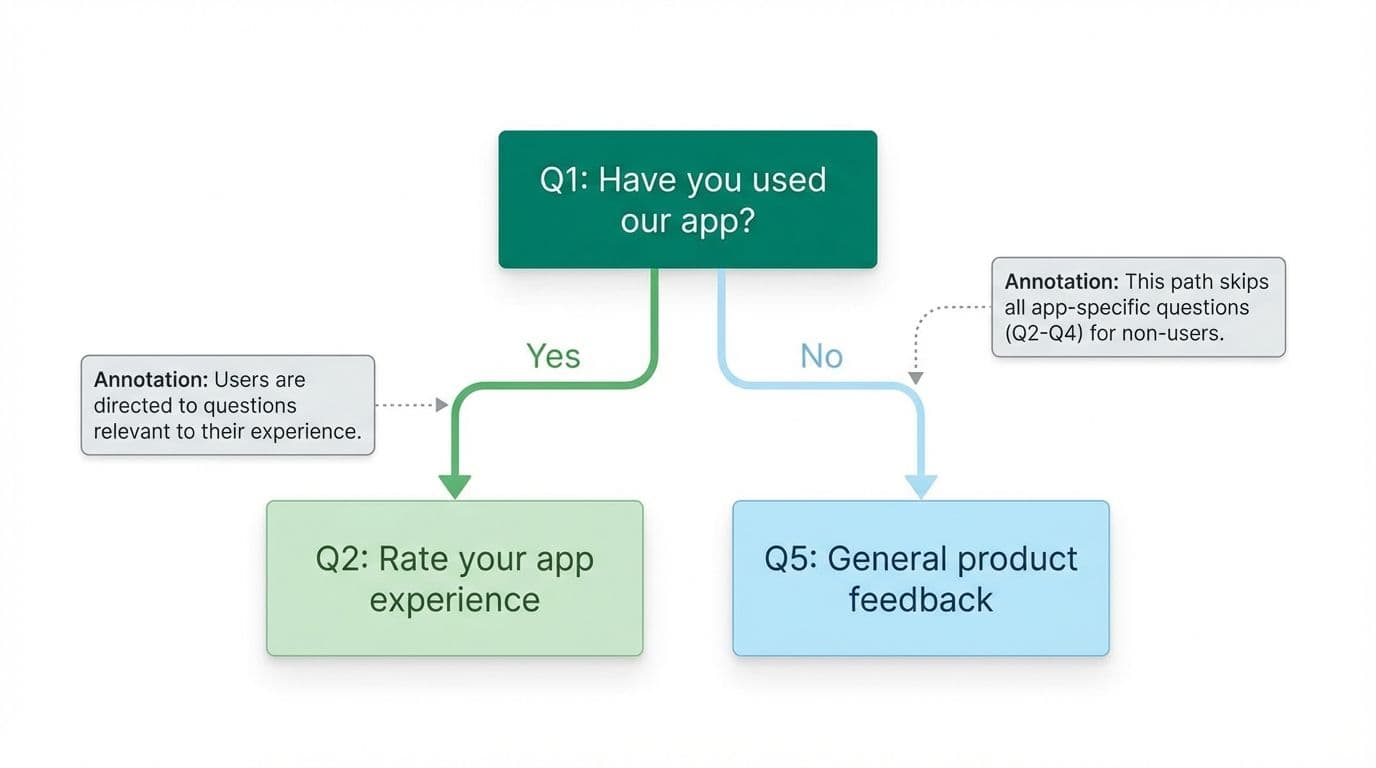
The concept is simple. You create a rule that says: if a respondent answers a specific question in a particular way, they skip ahead to a later question (or to the end of the survey). Respondents who answer differently follow the default path and see every question in order.
A practical example:
Question 1: Have you used our mobile app in the last 30 days?
• If the respondent answers "Yes," they proceed to Question 2 (which asks them to rate their app experience).
• If the respondent answers "No," they skip ahead to Question 5 (which covers general product feedback instead).
The result: someone who has never used the app is not asked to evaluate something they have no experience with. The data you collect from Question 2 is cleaner because every response comes from an actual app user. And the non-user gets a shorter survey, which makes them more likely to finish.
This is a basic example. In practice, skip logic can handle complex scenarios with multiple branches, nested conditions, and different end points for different respondent types.
Skip logic vs display logic
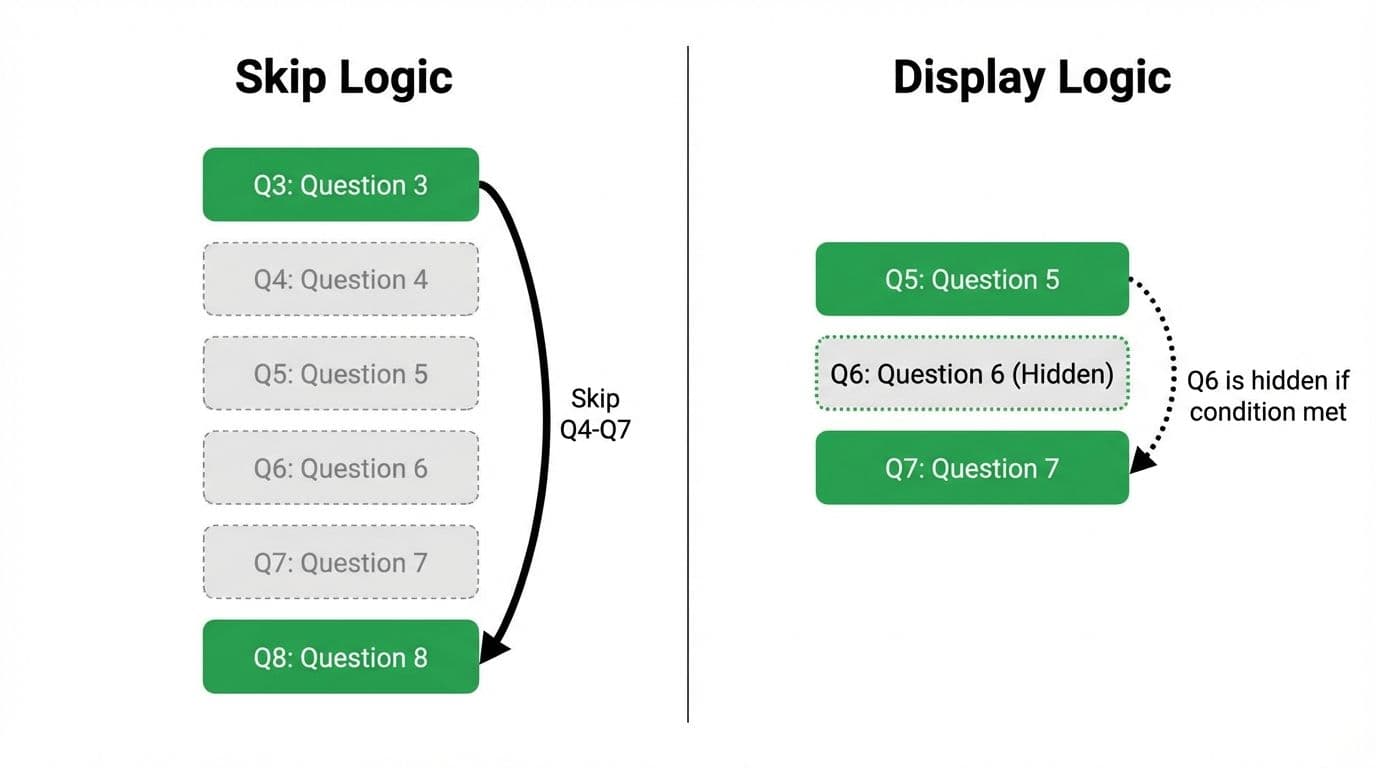
These two terms are often used interchangeably, but they describe slightly different mechanics.
Skip logic jumps the respondent forward to a later point in the survey, bypassing everything in between. If you skip from Question 3 to Question 8, the respondent never sees Questions 4 through 7.
Display logic controls visibility at the individual question level. A question with display logic only appears if a specific condition is met. The respondent does not jump ahead; the hidden question simply does not render on their screen.
In practical terms, both achieve the same outcome: ensuring each respondent only sees questions that are relevant to them. Most modern survey tools support both, and you can combine them within a single survey. Use skip logic for jumping past entire sections and display logic for showing or hiding individual questions within a section.
When to use skip logic
Skip logic adds value in almost any survey longer than 5 questions, but it is especially useful in these scenarios.
Screening and qualification
If your survey is only relevant to people who meet certain criteria (customers who purchased in the last 90 days, employees in a specific department, users of a particular feature), place a screening question at the start. Route non-qualifying respondents to a polite thank-you screen that explains why the survey is not relevant to them. This prevents wasted effort and protects data quality.
Product or feature feedback surveys
If you are collecting feedback on multiple products or features, only ask about the ones each respondent has actually used. A 30-question survey covering 6 features becomes a focused 10-question survey about the 2 features that specific person has experience with. The data is more accurate and the respondent is less likely to abandon.
Customer journey research
Post-purchase surveys frequently need to branch based on how the customer bought (online vs in-store), what product category they purchased, whether they interacted with support, and whether they are a first-time or repeat buyer. Skip logic keeps each path focused and prevents customers from answering questions about experiences they did not have.
NPS follow-up branching
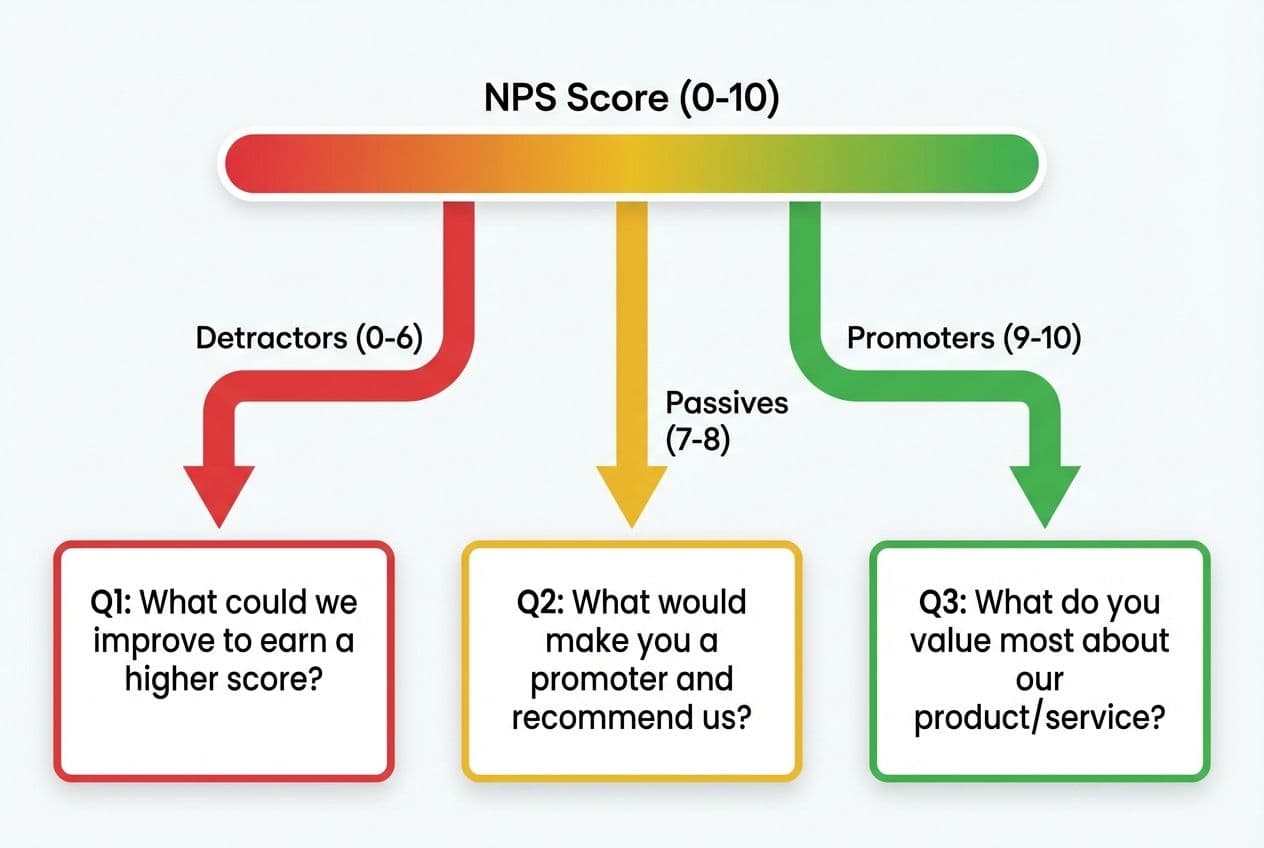
After the NPS score question, you can route respondents into different follow-up paths based on their rating. Promoters (score 9 to 10) might see "What do you value most about our product?" Detractors (0 to 6) might see "What would need to change for you to recommend us?" Passives (7 to 8) might get a different prompt asking what would turn them into a promoter. Each group sees a follow-up that actually makes sense for their sentiment. For a fuller overview of NPS methodology, see The Complete Guide to Online Surveys.
What skip logic gives you
• Shorter surveys per respondent. A 30-question survey with good logic might show 10 to 15 questions to any individual respondent, depending on their profile.
• Cleaner, more reliable data. People only answer questions they are qualified to answer. You eliminate the noise created by unqualified responses ("N/A" selections, random clicks, guesses).
• Higher completion rates. Shorter, more relevant surveys get finished more often. Tourangeau, Conrad and Couper (2013) found that perceived relevance is a significant predictor of survey completion.
• Less survey fatigue. When every question feels relevant, respondents stay engaged longer and give more thoughtful answers.
Common skip logic mistakes
Not testing every branch
The most frequent mistake is building the logic and then only testing the default (most common) path. Every branch needs individual testing. Take the survey yourself multiple times, selecting different answers each time, and verify that every path leads to the correct questions, in the correct order, with the correct end screen. This is tedious, and it is necessary.
Creating dead ends
A dead end is a logic path that leads nowhere: a blank screen, a question that assumes context the respondent does not have, or a loop that sends them back to a question they already answered. Dead ends usually happen when you add or rearrange questions after setting up logic but forget to update the routing rules. Draw your logic flow on paper (or in a simple diagram tool) before building it, and review it every time you edit the survey.
Over-branching
Skip logic is powerful, but a survey with 15 different branching paths becomes a nightmare to maintain, test and analyse. Every branch needs testing. Every path produces a different subset of data. If your logic diagram looks like a circuit board, you probably need to split the survey into two or three separate, simpler surveys instead.
Forgetting edge cases
If a question includes an "Other," "Not applicable" or "Prefer not to say" option, make sure your logic handles it. These responses frequently fall through the cracks and send respondents down an inappropriate path. When building logic rules, always check: what happens if someone selects the least common option?
Not accounting for mobile rendering
Complex branching that works smoothly on desktop can feel disorienting on mobile if questions appear and disappear rapidly or if the screen jumps unexpectedly. Test your branching on a phone and check that the transitions between questions feel smooth and natural.
How to set up skip logic in MindProbe
MindProbe's visual logic builder lets you add conditions to any question with a point-and-click interface. Select the trigger question, choose the answer that activates the rule, and set the destination question. The logic is displayed as a visual flow diagram so you can see every path at a glance and spot gaps or dead ends before launching. For more on the question types that support logic-based routing, see our glossary.
A simple planning template
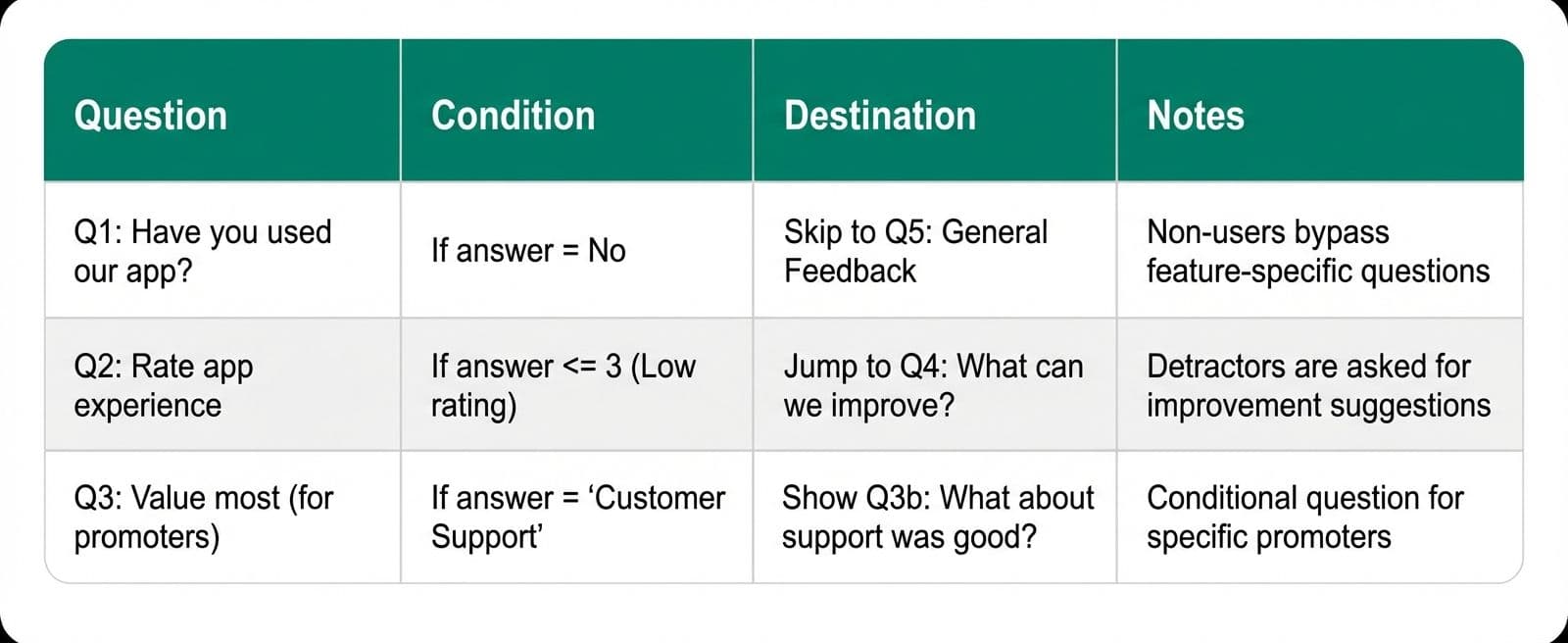
Before you start building logic in your survey tool, map it in a plain table. This takes five minutes and saves hours of debugging later.
• Column 1: Question number
• Column 2: Trigger condition (e.g., "If answer = No")
• Column 3: Destination (e.g., "Skip to Q5")
• Column 4: Notes (e.g., "Non-users bypass the feature feedback section")
Walk through each row of your table and confirm that every answer option has a defined route. Then build it in your tool. Then test it.
How skip logic affects your analysis
One thing teams often overlook is how skip logic changes the way you analyse your data. When different respondents see different questions, your sample sizes vary by question. A question that was only shown to 40% of respondents will have a smaller base than one shown to everyone. This is not a problem, but you need to account for it in your reporting.
Always report the base size alongside any percentage. Saying "85% of respondents rated the feature positively" is misleading if only 20 people saw that question out of 500 total respondents. Good practice is to report it as "85% of the 20 respondents who used this feature rated it positively." The insight is the same, but the reader can judge how much weight to give it.
If you are using a survey tool with built-in analytics, check whether it automatically adjusts base sizes for questions with logic applied. MindProbe handles this automatically in its reporting dashboard, showing the correct respondent count for each question regardless of how many logic paths your survey contains
For more survey design fundamentals, read The Complete Guide to Online Surveys.
Build smarter surveys with skip logic in MindProbe. Start free at mindprobe.ai
Frequently asked questions
What is skip logic in a survey?
Skip logic is a survey feature that routes respondents to different questions based on their answers. If a respondent's answer makes certain subsequent questions irrelevant, skip logic moves them past those questions to the next relevant one.
What is the difference between skip logic and branching logic?
They are the same thing described with different names. "Skip logic," "branching logic" and "conditional logic" all refer to the same feature: routing respondents through different paths in a survey based on how they answer specific questions.
Does skip logic improve response rates?
Yes. By reducing the number of questions each respondent encounters, skip logic makes surveys shorter and more relevant. Both of these factors increase completion rates and reduce abandonment.
Can I use skip logic with any question type?
Most survey tools support skip logic on multiple choice, dropdown, rating scale and yes/no questions. Open-text questions are harder to use as logic triggers because the responses are unstructured and cannot be easily matched to conditions. Check your tool's documentation for a full list of supported trigger types.
How many branches should a survey have?
As few as possible while still keeping questions relevant to each respondent. Two to four main branches is manageable for most teams. More than that increases testing burden and analysis complexity. If you need many branches, consider splitting into separate surveys.
REFERENCE LINKS (sources cited)
• Tourangeau, Conrad & Couper (2013) - The Science of Web Surveys: https://doi.org/10.1093/acprof:oso/9780199747047.001.0001
• Dillman, Smyth & Christian (2014) - Tailored Design 4th ed: https://doi.org/10.1002/9781119263685
• SurveyGizmo (2019) - Skip logic benchmarks: https://www.alchemer.com/resources/