The Complete Guide to Online Surveys: Everything You Need to Know

Samee
Online surveys are how the world's best brands stay close to their customers, employees, and markets. This pillar covers design, question types, step-by-step creation, free templates, distribution channels, benchmarks, and the best practices that separate good surveys from great ones.
4 billion people have internet access. Roughly 4.4 million surveys are completed online every single day. Yet despite the ease of creating a survey, SurveyMonkey's benchmark research finds the average email survey achieves just a 20–30% response rate - and many organisations still report that survey data rarely influences a single material decision.
The gap between running surveys and running surveys well is large. Organisations that close it consistently make better product decisions, retain more customers, and outperform their markets. Those that don't generate noise and erode respondent goodwill.
This guide is designed to close that gap. It covers every stage of the survey lifecycle - from defining your research objective and writing effective questions, to distributing surveys across the right channels, benchmarking your performance, and turning results into decisions. Whether you're building your first customer feedback survey or auditing a mature research programme, you'll find something actionable here.
Build your first survey in under 5 minutes
MindProbe's free plan includes generous response allowance, 30+ question types, skip logic and real-time analytics
1. What Is an Online Survey?
An online survey is a structured set of questions delivered via the internet, designed to collect information from a defined group of respondents. The responses are recorded digitally in real time - making online surveys faster, cheaper, and more scalable than any paper or telephone equivalent.
At its simplest, an online survey is a form. At its most sophisticated, it is a dynamic data-collection instrument that routes respondents through different question paths based on prior answers, adapts its language to the respondent's context, and feeds results directly into analytics dashboards. The technology has become so accessible that a working survey can be created and distributed in under ten minutes - but the quality of what you ask, to whom you ask it, and what you do with the answers determines whether that survey generates insight or noise.
The modern online survey has three essential components:
• The questionnaire: the questions themselves, in a defined sequence and format, chosen to generate the specific data the research objective requires
• The distribution mechanism: the channel or channels through which respondents are reached - email, shareable link, website embed, SMS, in-app prompt, QR code, or paid panel
• The analytics layer: the system that aggregates, visualises, and helps you interpret what respondents said - from basic frequency counts to cross-tabulations, NPS trend lines, and open-text sentiment
What distinguishes a good online survey from a mediocre one is not the technology - it is the quality of the design decisions made before a single respondent clicks 'Start'. The platform matters less than the objective clarity, question quality, logical flow, and rigour of the analysis process. The rest of this guide will walk you through those decisions systematically.
2. Survey vs Questionnaire: What's the Difference?
The terms 'survey' and 'questionnaire' are often used interchangeably - but they describe related, not identical, things. Understanding the distinction matters for research design and for communicating credibly with academic or enterprise stakeholders.
A questionnaire is the instrument: the structured set of questions that a respondent answers. It is a data-collection tool, nothing more. A survey is the broader process: it includes the questionnaire, but also the sampling strategy, the method of administration, the data collection process, and the analysis and reporting of findings.
Put another way: every survey uses a questionnaire, but not every questionnaire is part of a survey. A medical intake form is a questionnaire. A patient satisfaction study that uses a validated questionnaire, samples a representative group of patients, analyses responses statistically, and produces a report - that is a survey.
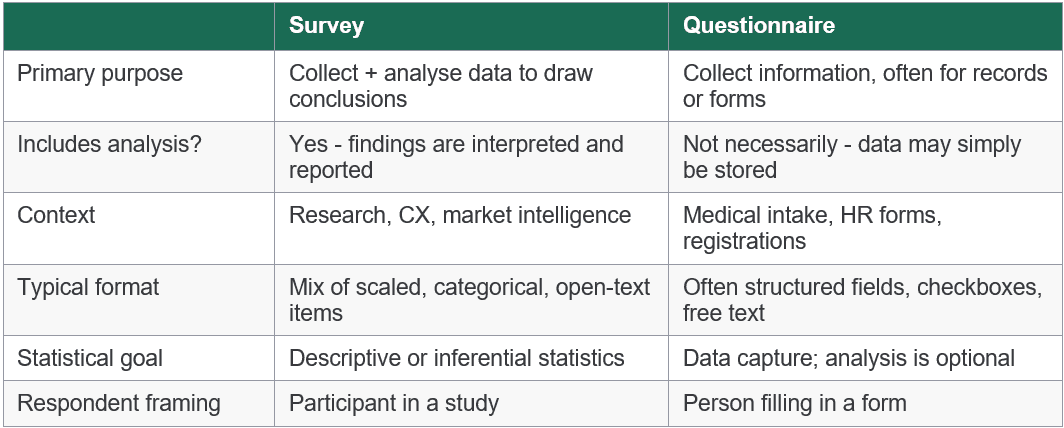
In practice, for most commercial and research contexts covered in this guide, the distinction is subtle. When someone says 'I'm creating a survey', they usually mean 'I'm designing a questionnaire to be administered as part of a survey process'. Both terms appear throughout this guide. For a deeper treatment, see our dedicated article on survey vs questionnaire.
3. The Survey Lifecycle: A Framework for Every Programme
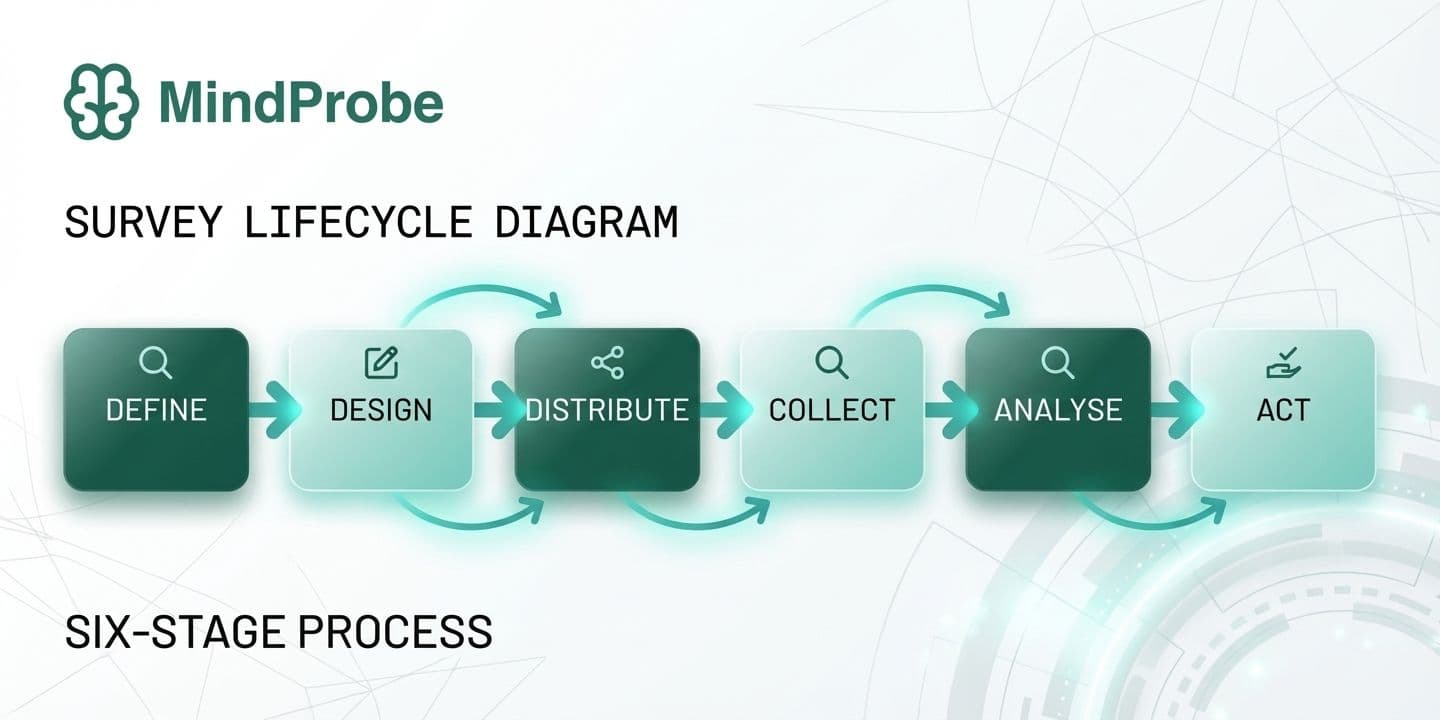
Before diving into tactics, it helps to understand how high-performing survey programmes are structured. The survey lifecycle below is a framework applicable whether you're running a one-off customer satisfaction study or a continuous brand tracking programme. It applies equally to a two-question NPS survey and a 40-item academic instrument.
- Define - Set objectives and choose survey type
- Design - Write questions and apply logic and branding
- Distribute - Select channels and time your send
- Collect - Monitor responses and manage quotas
- Analyse - Clean & quantify theme open text
- Act - Report findings and close the loop
Why most survey programmes fail - and where
Most organisations under-invest in stages 1 (Define) and 6 (Act) - and over-invest in stage 3 (Distribute). The result is high response volumes and low impact. Data sits in dashboards, reports get skimmed, and stakeholders move on without making a single decision differently. The most consequential question in any survey programme is not 'How do we get more responses?' but 'What decision will this data support, and who needs to see it to act?'
Stage 1 failure looks like this: the survey is launched before anyone has written down what problem it is supposed to solve. Questions are added because they seem interesting, not because they map to a specific analytical need. The result is a long survey with weak data.
Stage 6 failure looks like this: findings are presented to a leadership team, acknowledged, and filed. No owner is assigned, no timeline is set, no follow-up is scheduled. Respondents who gave 15 minutes of their time never hear what changed. Participation rates in subsequent surveys decline.
The MindProbe perspective: Survey programmes with a defined action framework at the outset - a named decision owner, a scheduled debrief, and a pre-agreed reporting format - are significantly more likely to result in a documented process change than those without. The survey itself is only as valuable as the organisational infrastructure built around it.
4. Types of Online Surveys
Online surveys are not a monolithic category. Each major type has a distinct purpose, audience, and analytical goal. Understanding which type you need shapes every downstream decision about design, distribution, and analysis.
Customer Satisfaction Surveys (CSAT & NPS)
Customer satisfaction surveys measure how well a product, service, or interaction met expectations. The most common formats are CSAT (a direct 'How satisfied were you?' rating, typically 1-5) and Net Promoter Score (NPS) (a 0-10 likelihood-to-recommend scale that classifies respondents as Promoters, Passives, or Detractors and generates an aggregate score from −100 to +100). Both are short - one to five questions - and are most effective when triggered immediately after a relevant touchpoint: a purchase, a support interaction, an onboarding call.
CSAT tells you how satisfied someone was with a specific experience. NPS tells you how loyal they feel toward the brand overall. Used together with an open-text 'Why did you give that score?' follow-up, they provide both a trackable metric and a qualitative explanation - the combination that drives the most useful action.
Employee Engagement Surveys
Employee engagement surveys assess how committed, motivated, and satisfied your workforce is. They range from annual deep-dives (30-60 items across dimensions like role clarity, manager quality, growth opportunity, psychological safety, and belonging) to rapid 'pulse' surveys of 5-10 questions sent weekly or monthly. Pulse formats have become the industry norm as organisations seek faster feedback loops - quarterly or annual surveys leave a nine-to-twelve month lag between problem onset and measurement.
The most effective employee survey programmes combine an annual benchmark survey (to establish baselines and year-on-year trends) with a rolling pulse programme (to catch emerging issues early). Manager-level reporting - so that team leads can see their own team's scores and act independently - is associated with significantly higher engagement impact than organisation-level reporting alone.
Market Research Surveys
Market research surveys gather data about consumer attitudes, behaviours, and preferences - typically to inform product development, pricing, messaging, or segmentation. Unlike satisfaction surveys, they are usually fielded to a sample representing a broader target market, not just existing customers. Common methodologies include concept testing (showing respondents descriptions or prototypes of new products), pricing studies (Van Westendorp or Gabor-Granger methods), segmentation studies, and communications testing.
The sample design for market research surveys requires more care than for CX surveys: quota controls (ensuring the right mix of demographics, firmographics, or behavioural segments), screening questions to qualify respondents, and often a paid panel to reach the right audience at sufficient volume.
Brand Tracking Surveys
Brand tracking surveys measure awareness, perception, and preference over time, allowing organisations to understand how their marketing investment and competitive activity affect brand equity. They are fielded at regular intervals - monthly, quarterly, or biannually - using a consistent questionnaire, so that changes in metrics can be attributed to real-world events rather than instrument variation. Key measures include unaided and aided brand awareness, brand associations, consideration and preference, and Net Promoter Score relative to competitors. For a deeper treatment of methodology, see our Complete Guide to Brand Research.
Academic & Research Surveys
Academic surveys follow stricter methodological standards than commercial ones. IRB approval, validated scales (Cronbach's alpha > 0.7 as a reliability benchmark), probability sampling, and rigorous cognitive pre-testing are the norm rather than the exception. They are designed to test hypotheses rather than inform immediate business decisions, and the data output supports inferential statistical analysis: regression, structural equation modelling, factor analysis, ANOVA.
The distinction between academic and commercial survey standards is significant, and the gap between them is often where commercial research goes wrong. Applying academic rigour - validated scales, attention checks, representative sampling, blind question randomisation - to commercial surveys is one of the highest-impact investments a research function can make.
5. Online Survey Question Types
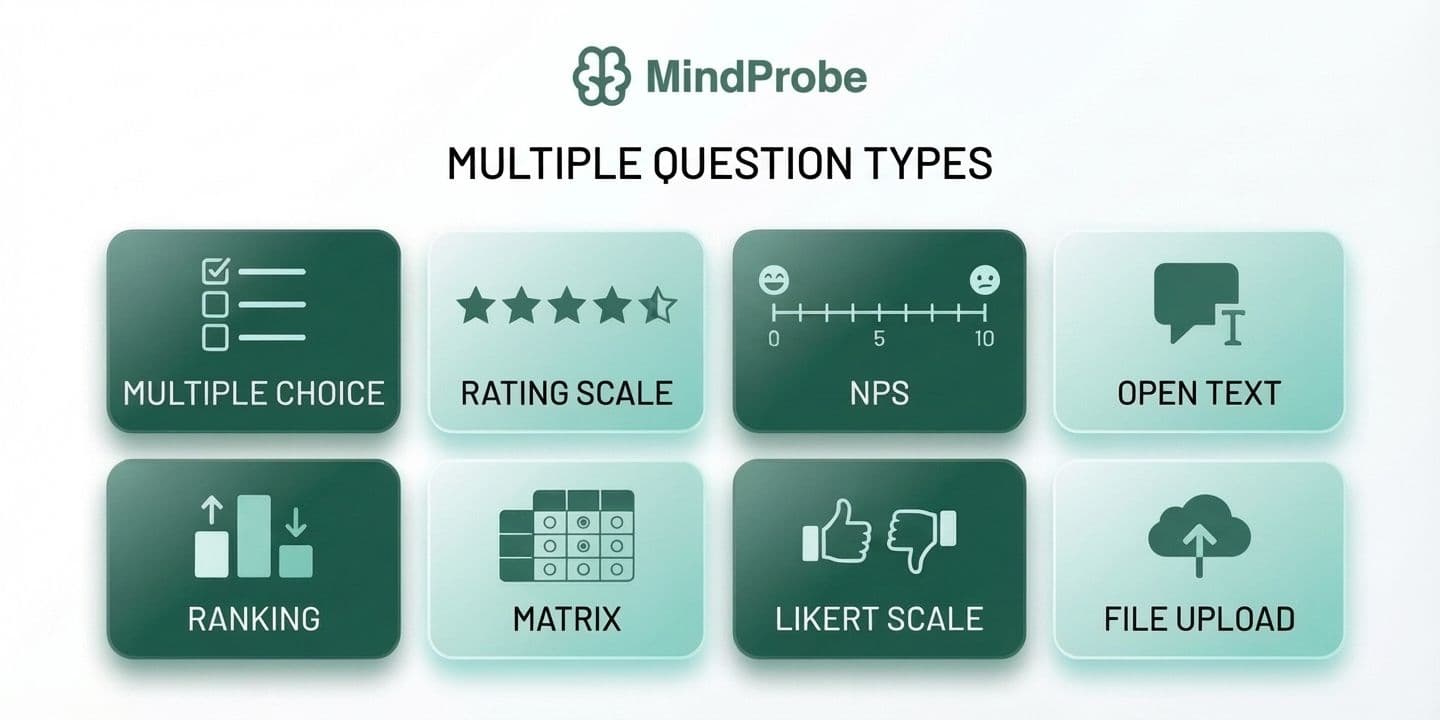
Choosing the right question type for each data point is one of the highest-leverage decisions in survey design. Use the wrong format and you either make statistical analysis impossible, or you force respondents into answer choices that don't reflect their reality - generating data that looks clean but is structurally flawed.
• Multiple choice (single select): one option from a defined list. Use for categorical variables - role, region, customer tier, product used. Simple to analyse; limited to mutually exclusive options.
• Multiple choice (multi-select): all options that apply. Ideal for awareness questions ('Which of these brands have you heard of?') or behaviour questions ('Which channels do you use to contact support?').
• Rating scales (Likert / numeric): agreement or satisfaction rated on a defined scale - typically 1-5 or 1-7. The backbone of attitudinal research. Key: maintain consistent direction and label your endpoints clearly.
• Net Promoter Score (0-10): a single likelihood-to-recommend scale. Generates promoter / passive / detractor classifications and an aggregate NPS figure from −100 to +100.
• Ranking: respondents order items by preference or importance. Useful for prioritisation; cognitively demanding and unreliable beyond 5-6 items.
• Matrix / grid: multiple statements rated on the same scale in a table. Efficient for surveying many attributes at once, but prone to satisficing and straight-lining if overused or placed late in the survey.
• Open text (short / long): free-form responses. Your richest data source and most time-intensive to analyse. One to two open-text questions per survey is usually the right balance.
• Dropdown: single-select presented as a dropdown menu. Best for long, ordered lists - countries, job titles, industry categories - where a checkbox list would be unwieldy.
• Specialist types: file upload (UX research, academic), heatmap (ad testing, website feedback), conjoint ( pricing studies, product feature prioritisation), video response (qualitative depth without in-person interviews).
MindProbe supports 30+ question types across all six categories - choice, input, scale, ranking, personal information, and advanced - giving teams the full toolkit without platform-switching. For a full treatment of every format, when to use it, and how to write it well, read our Survey Question Types: The Complete Guide.
6. How to Design an Online Survey That Gets Results
Survey design is where most research programmes fail - not at the distribution or analysis stage. Poorly worded questions, illogical flow, and surveys that are longer than they need to be degrade data quality before a single response arrives. This section covers the decisions that matter most.
Start with a single, precise research objective
Before writing a question, articulate exactly what decision the survey data needs to support. 'We want to understand customer satisfaction' is not a research objective. 'We need to identify which post-purchase touchpoints correlate with lowest satisfaction scores so we can prioritise CX investment in Q3' is. Write the objective in one sentence, share it with all stakeholders before design begins, and return to it whenever you're tempted to add a question that doesn't clearly map to it.
Write questions that are specific, neutral, and unambiguous
The cardinal rules of survey question writing are well-established in the psychometric literature (Dillman, Smyth & Christian, 2014). Four violations account for the majority of survey data quality problems:
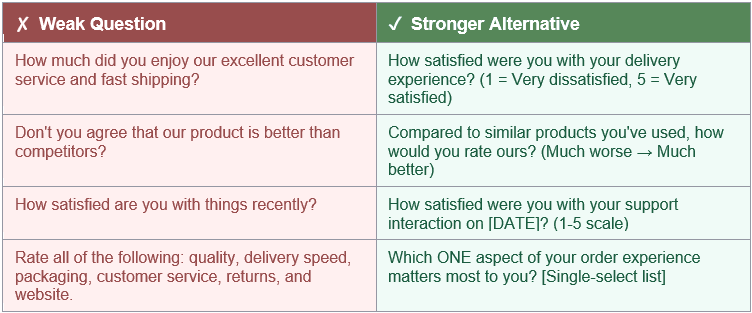
• Double-barrelled questions ask about two things at once. 'How satisfied are you with our product quality and customer service?' cannot be answered meaningfully with a single rating - split it into two questions.
• Leading language signals the desired answer. 'How much did you enjoy our excellent onboarding?' is not a neutral question. Replace evaluative adjectives with specific, neutral descriptors.
• Vague time references produce inconsistent interpretations. 'Recently' means yesterday to one respondent and six months ago to another. Use specific windows: 'in the past 30 days', 'since your last purchase'.
• Unbalanced scales over-represent one direction. A 4-point scale from 'Very satisfied' to 'Satisfied' to 'Somewhat dissatisfied' to 'Very dissatisfied' loads toward the positive. Use equal positive and negative options, typically with a neutral midpoint.
Good questions vs. weak questions: a practical comparison
The table below shows how common question-writing mistakes manifest - and how to correct them. Each weak example represents a real pattern seen in live survey programmes.
Use skip logic to personalise the experience
Skip logic (conditional branching) routes respondents to different questions based on prior answers, ensuring each person only sees questions relevant to their situation. A question about subscription tier only needs to reach confirmed subscribers; a question about the returns process only needs to reach customers who have returned a product. The result is a shorter, more relevant survey for every individual respondent - which directly improves completion rates and response quality. For a full implementation guide, see What Is Skip Logic in Surveys and How Do You Use It?. Glossary: skip logic.
Manage length deliberately
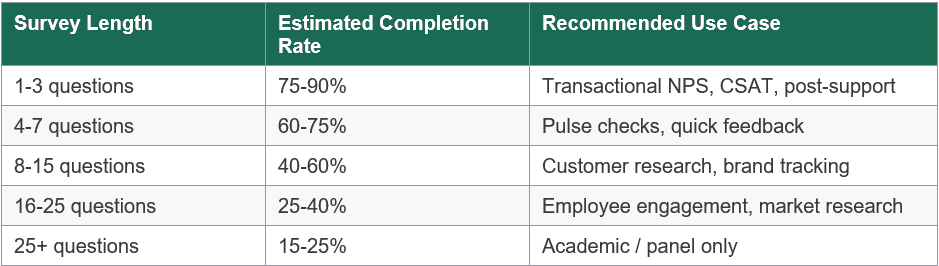
Survey fatigue is measurable and costly. Research published in Public Opinion Quarterly (Galesic & Bosnjak, 2009) found that completion rates fall sharply after 7-8 minutes, and that late-survey answers become significantly less considered than early-survey answers. The table below shows the relationship between survey length and typical completion rates:
For more on managing cognitive load and keeping respondents engaged, see Survey Fatigue: What It Is and How to Design Surveys That Avoid It. Glossary: survey fatigue.
Optimise for mobile
More than half of all survey responses are now captured on mobile devices. Design with mobile as the primary canvas: use vertical single-column layouts, avoid matrix questions with more than four columns, ensure tap targets meet the 44px minimum accessibility standard, keep open-text fields small by default (users can expand), and test across at least two device sizes and two operating systems before launch.
7. How to Create an Online Survey: Step-by-Step
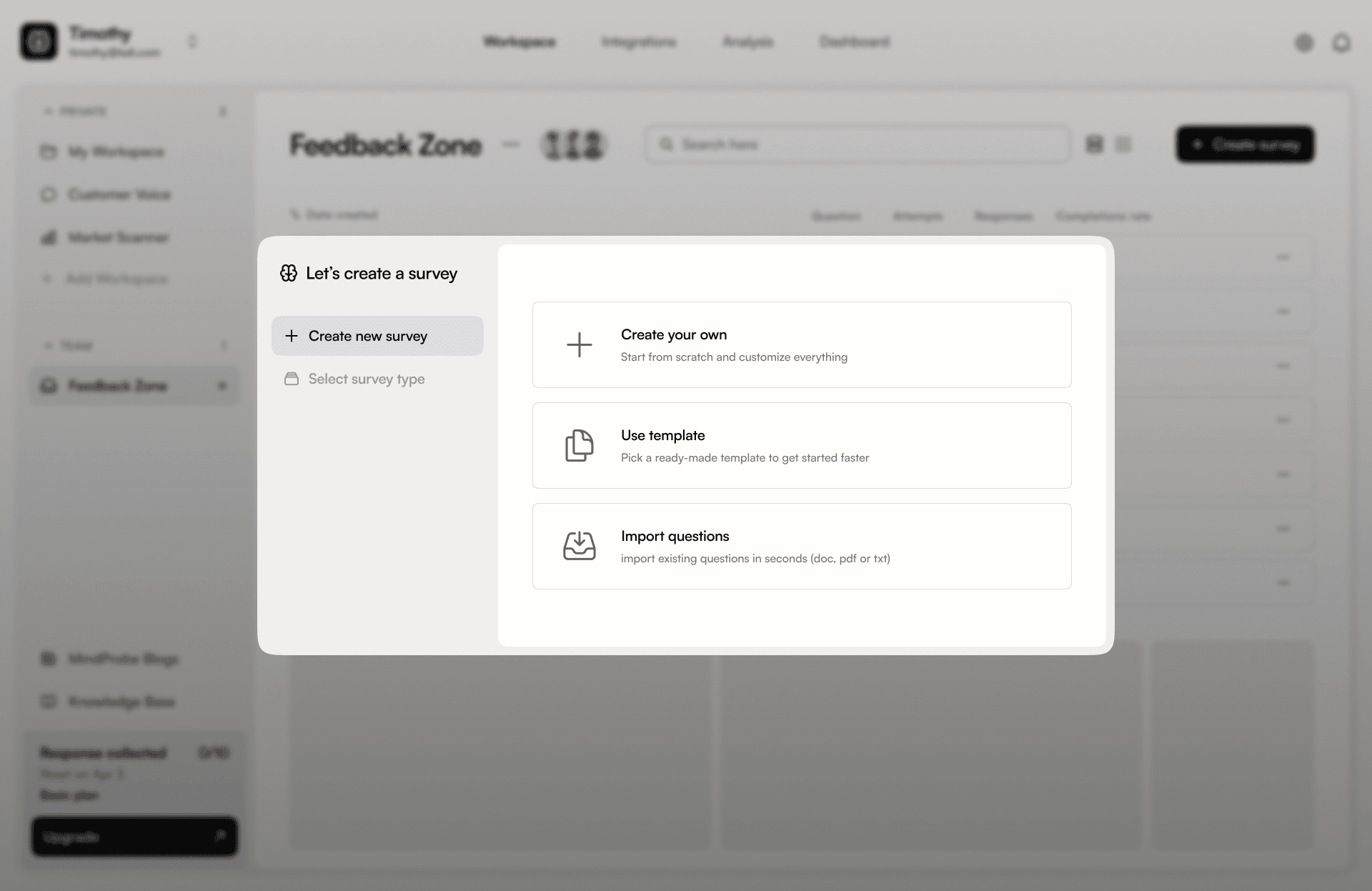
Knowing survey design principles is one thing; translating them into a live survey is another. The following seven-step process is the framework used by experienced survey practitioners - from in-house CX teams to independent researchers. It is deliberately sequential: skipping or reversing steps is the most common cause of avoidable survey problems.
Common time estimates by survey type
Understanding how long each stage typically takes helps with research planning and stakeholder expectation-setting:
• Transactional CSAT / NPS: 1-2 hours total (design to live). These are short, simple surveys with established question formats.
• Pulse surveys (5-10 questions): Half a day including pilot. Template-based approaches reduce design time significantly.
• Customer research surveys (15-25 questions): 2-5 days including design, stakeholder review, pilot, and revision.
• Market research or brand tracking (20+ questions): 1-2 weeks including stakeholder alignment, sample design, pilot, and revision cycle.
• Academic surveys: Weeks to months, depending on institutional review requirements and the scale of cognitive pre-testing.
MindProbe's survey builder supports every step of this process in a single platform - from question design and logic configuration through to branded distribution and analytics.
8. Free Survey Templates
One of the fastest ways to create a high-quality survey is to start from a proven template rather than a blank page. Well-designed templates encode question-writing best practices, validated scale formats, and logical question ordering - saving time and reducing the risk of common design errors.
Below covers the eight most commonly used survey templates, with guidance on question count, key question types, and the contexts where each template performs best. All are available on MindProbe as fully editable starting points.
Customer Satisfaction (CSAT) Survey
The customer satisfaction survey is one of the most widely used templates across B2C and SaaS businesses. It’s designed to capture immediate feedback after a key interaction, such as a purchase, delivery, or support experience.
A typical CSAT survey includes between three and five questions. These usually combine a rating scale question, a Net Promoter Score-style metric, and an open-ended follow-up to understand the reasoning behind the score.
This template works best when deployed in real time, directly after a customer interaction. Timing is critical here, as delayed surveys tend to lose context and reduce response accuracy.
Net Promoter Score (NPS) Survey
The Net Promoter Score survey is focused on one thing: measuring customer loyalty and advocacy.
Unlike broader satisfaction surveys, NPS is intentionally minimal. It typically includes two to three questions. The core question uses a 0 to 10 scale asking how likely someone is to recommend your product or service, followed by an open-ended question to understand why.
This survey is most effective when run on a recurring cadence, such as quarterly, to track changes in customer sentiment over time. Because it is standardised, it also allows for benchmarking across industries.
Employee Engagement Pulse Survey
Employee engagement surveys are designed to capture internal sentiment quickly and consistently.
A pulse survey usually includes five to eight questions, using Likert scales, ratings, and open text responses. These surveys focus on areas such as morale, workload, leadership, and overall satisfaction.
They are typically deployed monthly or quarterly to track trends rather than one-off feedback. Shorter surveys perform better here, as employees are more likely to engage regularly when the time commitment is low.
Product Feedback Survey
Product feedback surveys are essential for validating new features, releases, or updates.
These surveys are slightly longer, usually containing six to ten questions. They combine rating questions, multi-select options, and open-ended responses to capture both quantitative and qualitative insights.
The best time to deploy a product feedback survey is immediately after a user interacts with a new feature or completes a key workflow. This ensures feedback is contextual and actionable.
Market Research / Consumer Survey
Market research surveys are more comprehensive and designed to inform strategic decisions such as segmentation, positioning, or concept testing.
These surveys typically include ten to fifteen questions and use a wide mix of formats including multiple choice, ranking, rating scales, and open text responses.
Because of their length, these surveys are usually distributed to targeted audiences rather than embedded in-product. They are best used for deeper research initiatives rather than ongoing feedback loops.
Brand Awareness Tracker
Brand tracking surveys are used to measure how your brand is perceived over time.
These surveys usually include eight to twelve questions, covering aided and unaided recall, brand perception, and comparative positioning. Question types often include recall-based prompts, rating scales, and multiple choice.
They are typically run quarterly to monitor brand equity and track the impact of marketing campaigns.
Event Feedback Survey
Event feedback surveys are designed to evaluate the success of events such as webinars, conferences, or workshops.
They are short and focused, usually containing four to six questions. These include satisfaction ratings, likelihood to return, and open-ended feedback.
The key to success with this template is immediacy. Sending the survey immediately after the event significantly increases response rates and accuracy.
Website UX Feedback Survey
Website UX surveys are used to understand user behaviour and friction points directly within the product or website experience.
These surveys typically include four to seven questions, combining rating scales, task completion questions, and open text feedback.
They are most effective when deployed continuously as in-product intercepts, capturing feedback at moments of friction or drop-off. This approach helps uncover the “why” behind behavioural data. What makes a good survey template?
Not all templates are equal. A high-quality template should include:
- A clear purpose statement at the top, visible to the respondent, explaining who is conducting the survey and how data will be used
- Validated question wording for the key constructs being measured - particularly for NPS, CSAT, and employee engagement dimensions
- A logical question flow: screener questions first, core metrics next, diagnostic questions after, demographics last
- Skip logic configured for the most common branching scenarios - so you can activate it without starting from scratch
- A branded, professional thank-you screen with a clear message about next steps
Templates are starting points, not finished surveys. Always review every question against your specific research objective, adapt the language to your audience, and pilot test - even a template can contain questions that don't make sense in your context.
Template tip: When adapting an NPS template, the most important customisation is the follow-up open-text question after the 0-10 scale. 'What is the main reason for your score?' is the generic version. 'What is the one thing we could do to improve your experience with [product/service]?' is more actionable and generates more specific, useful responses.
9. Survey Branding: Why It Matters
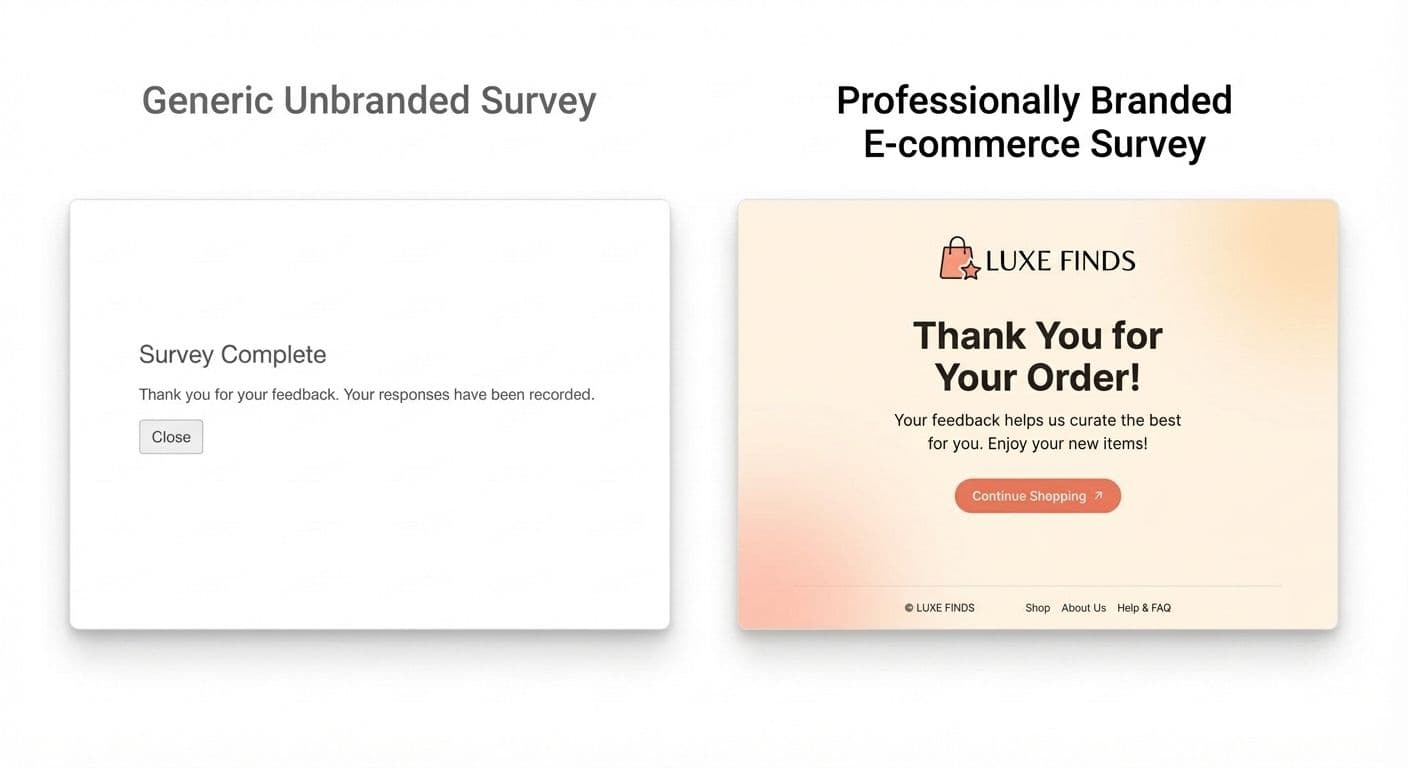
Survey branding - custom colours, logo, fonts, and thank-you screens - is not a cosmetic feature. It has a direct, documented impact on both response rates and data quality, and it is one of the most under-leveraged levers available to survey practitioners.
Trust and response rates
Respondents who recognise an organisation's branding are significantly more likely to complete a survey than those presented with a generic, unbranded form. SurveyMonkey's brand trust research found that branded surveys from recognised organisations generated response rates up to 2× higher than their unbranded equivalents. The mechanism is straightforward: trust reduces the friction of participation. An unbranded form - particularly one served from a third-party domain respondents don't recognise - activates the same cognitive alarm as an unsolicited email.
Data quality
Beyond response rate, branding affects the quality of responses. When respondents understand clearly who is asking and why, they give more considered, complete, and honest answers. Unbranded surveys generate higher rates of partial completion, straight-lining (selecting the same response across all matrix items), and mid-survey abandonment - all of which compromise the validity of downstream analysis.
The effect is particularly pronounced for sensitive topics - employee satisfaction, health-related questions, financial behaviour. A branded, trusted form significantly outperforms a generic one when the questions themselves require a degree of vulnerability.
Consistency across touchpoints
A survey experience that looks and feels inconsistent with the rest of your brand creates cognitive dissonance and subtly undermines confidence. If your customer receives a purchase confirmation email in your brand fonts and colours, then immediately receives a satisfaction survey in a generic blue-and-white platform template, the mismatch signals either negligence or a third party asking questions on your behalf - neither of which builds trust. MindProbe's branding tools allow teams to apply custom colours, logos, and custom domain URLs to every survey, maintaining a seamless brand experience from email invitation to thank-you screen. For a full treatment of survey branding strategy and implementation, read What Is Survey Branding and Why It Matters. Glossary: survey branding.
10. How to Distribute Your Survey
A well-designed survey that reaches the wrong people - or nobody at all - generates no valid data. Distribution strategy determines who responds, in what context, and with what mindset. The channel you choose affects not only response rate but also the type of respondent you reach and the quality of their answers. Glossary: survey distribution.
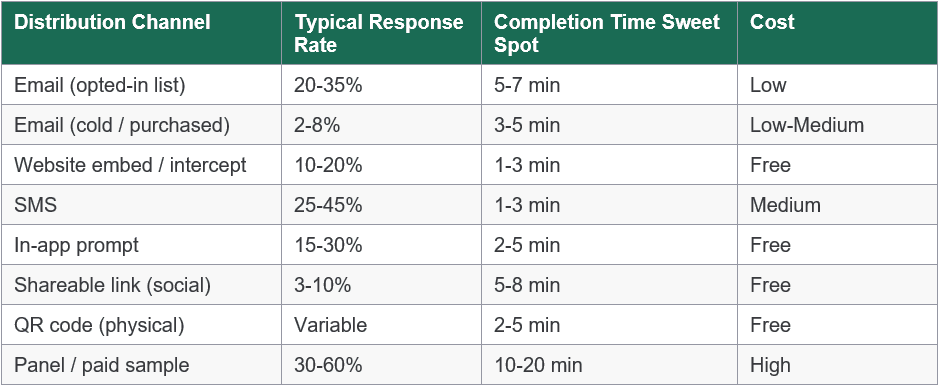
Email remains the highest-performing channel for reaching existing customers, employees, and CRM contacts. Three factors have the greatest measurable impact on open and completion rates:
- Personalised subject line that names the sender and purpose
- Clear, honest estimate of completion time in the email body
- Sending from a recognisable human name rather than a 'noreply@' address.
Additionally, A/B testing subject lines on a small initial sample before full send can lift open rates by 15-25%.
Website embed and in-app prompts
Embedding a survey within a web page or product interface captures feedback at the moment of maximum relevance - immediately after a transaction, a feature interaction, a support resolution, or an onboarding step. The closer the survey prompt is to the experience being measured, the more accurate and useful the data. Exit-intent surveys and post-purchase NPS widgets are common implementations; in-app microsurveys (1-2 questions shown inline) achieve high completion rates with minimal friction.
SMS
SMS surveys achieve open rates exceeding 90% because messages are read within minutes of receipt. They perform best for 1-3 question surveys in post-service or field-service contexts: delivery confirmation, appointment follow-up, post-installation satisfaction. The brevity requirement is a constraint, not a limitation - it forces the clarity that most surveys lack.
QR codes
QR codes bridge physical and digital contexts. They are most effective in retail, hospitality, healthcare, and events settings - on a receipt, a product package, a menu, or an event badge. The barrier to response is low (scan and start), and they require no audience list or CRM integration. Response volumes are variable and depend heavily on placement visibility and incentive.
For a complete guide to lifting response rates across all channels, read How to Improve Survey Response Rates: 14 Proven Tactics.
11. Response Rate & Completion Benchmarks
One of the most common questions in survey practice is: 'Is our response rate good?' The honest answer depends on your channel, your relationship with the audience, and your survey length. The benchmarks below provide reference points - not targets to optimise blindly.
20-30%: Average email survey response rate for opted-in customers (SurveyMonkey benchmarks, 2024)
57%: Of survey responses are now captured on mobile devices (Statista, 2024)
~7 min: Survey completion time above which drop-off rates increase sharply (Galesic & Bosnjak, 2009)
NPS benchmarks by industry
NPS is only meaningful in context. A score of +35 in telecoms represents strong performance; the same score in SaaS suggests meaningful room for improvement. Use the industry benchmarks below when setting targets and interpreting results.
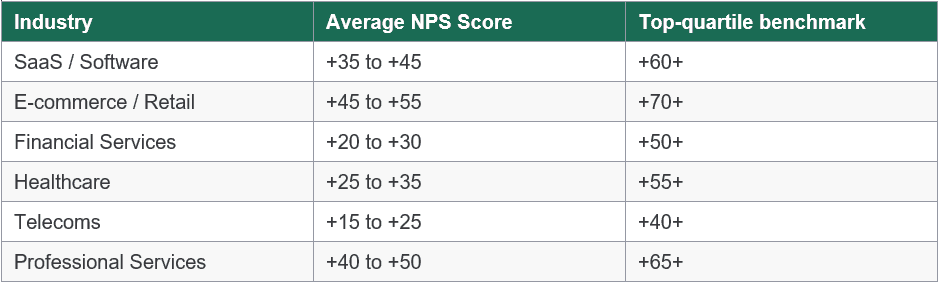
Important: Response rate is a measure of reach, not of data quality. A 12% response rate from a rigorously representative sample is more valuable than a 60% rate from a heavily self-selected population. Always assess who responded - age, tenure, satisfaction tier, purchase recency - not just how many.
Mini case study: 12% to 31% response rate
Case: A B2B SaaS company with a 4,000-customer base was achieving a 12% response rate on its quarterly NPS survey. After auditing the programme, three changes were made:
- The survey was reduced from 14 questions to 6, cutting estimated completion time from 9 minutes to 3.5 minutes
- The send was moved from a generic 'feedback@' address to the named Customer Success Manager for each account
- A single follow-up reminder was sent 5 days later to non-respondents only.
In the following quarter, the response rate increased to 31% - a 158% improvement - with no change to audience size or incentive structure.
12. Online Survey Best Practices
The following 12 best practices represent distilled guidance from academic research and industry experience. For an expanded treatment of each, read Online Survey Best Practices: 12 Things That Separate Good Surveys From Bad Ones.
1. Define your research objective before writing a single question. Every question must map to a decision.
2. Keep surveys short. Aim for under 5 minutes for transactional surveys; under 10 minutes for research surveys.
3. Use validated scales. For satisfaction, engagement, or brand perception, validated instruments produce more reliable data than bespoke questions.
4. Ask one thing per question. Double-barrelled questions make data uninterpretable.
5. Order general before specific. Start with broad, low-effort questions to build respondent confidence.
6. Maintain consistent scale directions. If 1 means 'strongly disagree' in Q1, that convention must hold throughout.
7. Pilot test before launch. A 5-person cognitive interview surfaces problems invisible to the survey creator.
8. Brand your survey. Logo, colours, and a professional thank-you screen increase trust and completion. Generic forms feel like phishing.
9. Use skip logic. A 20-question survey with good logic can feel like 8 questions to most respondents.
10. Send at the right time. For B2B email surveys, Tuesday-Thursday mornings outperform Monday and Friday sends. For transactional surveys, trigger within 24 hours of the event.
11. Include a purpose statement and opt-out. Transparency improves response quality and is a legal requirement under GDPR.
12. Close the loop. Tell respondents what you learned and what changed. 'You told us X, so we did Y' is one of the most powerful drivers of future participation.
13. How to Analyse Survey Results

Collecting responses is only half the work. The analysis phase is where raw data becomes the insight that justifies the investment of respondent time and organisational resource. A structured analysis process covers four stages: data cleaning, quantitative analysis, qualitative analysis, and reporting.
Step 1 - Data cleaning
Before analysing anything, remove responses that compromise data integrity. The criteria are: surveys completed in implausibly short time (typically under one-third of the median completion time); straight-lining across matrix questions (identical responses to every item in a grid); obvious nonsense in open text fields; and duplicate submissions from the same IP address or respondent identifier. Most platforms flag these automatically. Leaving dirty data in the dataset inflates or deflates every downstream metric.
Step 2 - Quantitative analysis
For closed questions, start with descriptive statistics: frequencies and percentages for categorical variables; means, medians, and standard deviations for scale variables. Then use cross-tabulation to break results down by segment - company size, job role, geography, satisfaction tier, tenure, product version. Aggregate numbers hide the differences between groups, and those differences are almost always the most actionable part of the data.
For samples of 200+ responses, inferential statistics allow you to test whether differences between groups are statistically significant: chi-square tests for categorical variables, t-tests or ANOVA for scale comparisons, regression for identifying drivers of satisfaction or other outcomes. The distinction between a statistically significant finding and a practically significant one matters - a 0.3-point difference on a 7-point scale may be statistically significant at scale but too small to act on.
Step 3 - Qualitative analysis
Open-text responses are your richest data source and your most time-intensive to analyse. For small samples (under ~200 responses), manual thematic coding - grouping responses by topic and sentiment - is feasible and often preferable, as it forces close reading of the data. For larger volumes, text analytics automate the process: sentiment scoring, keyword extraction, and topic modelling can process thousands of responses in seconds. MindProbe's analytics layer includes response tagging and sentiment scoring for open-text questions, significantly reducing the manual burden for teams running high-volume programmes.
Step 4 - Reporting
Effective survey reports include: a one-page executive summary with the three to five most important findings and specific recommended actions; visualisations that show the most important patterns rather than every data point; and appendices with detailed segment breakdowns for stakeholders who need to go deeper. Every finding should connect back to the research objective defined before design. Every recommendation should name an owner and a timeframe.
Reporting principle:'NPS fell 8 points among enterprise customers' is a finding. 'We recommend auditing onboarding for enterprise accounts in Q2, because NPS declined 8 points in that segment following the January product update, driven primarily by confusion about the new admin interface (62% of open-text responses cited this)' is actionable insight. The difference is specificity, attribution, and a named next step.
From survey to insight in one platform
MindProbe's built-in analytics handles quantitative summaries, cross-tabs, NPS trend tracking, and open-text sentiment - without exporting to another tool.
14. Common Online Survey Mistakes to Avoid
These mistakes appear repeatedly across survey programmes of all sizes and sectors. Each is avoidable with deliberate design choices - and each has a measurable cost in data quality or respondent trust.
- Writing questions before defining objectives. Questions without a clear analytical purpose clutter the survey, fatigue respondents, and generate data nobody uses. Every question should answer: 'What decision does this data support?'
- Making surveys too long. Each additional minute beyond 7-8 minutes increases abandonment meaningfully. Draft every question you think you need, then cut any that aren't essential to the stated objective.
- Using leading or loaded language. Questions that signal the desired answer produce biased data that overstates positive sentiment. Replace adjectives like 'excellent', 'helpful', and 'easy' with neutral descriptors.
- Neglecting mobile. More than half of responses come from mobile devices. A desktop-only design - wide matrices, small text inputs, horizontal scroll - means high drop-off among your largest respondent segment.
- Ignoring skip logic. Showing every respondent every question, regardless of relevance, increases perceived length, reduces relevance, and frustrates respondents confronted with questions about products or experiences that don't apply to them.
- Skipping the pilot test. What seems clear to the survey creator often confuses respondents. A 5-10 person pre-launch test consistently surfaces misunderstandings, technical issues, and order effects that desk review misses.
- Failing to act - or to communicate what changed. Survey programmes that visibly influence no decisions erode respondent trust and drive down future participation. Close the loop: share aggregated findings and tell respondents what changed.
15. How to Choose the Right Survey Tool
The online survey platform market is large and varied. Platforms differ substantially in question library depth, analytics sophistication, branding flexibility, compliance capabilities, and pricing models. Before committing, read through our article here and work through these five questions - and use the comparison table below as a starting point.
1. Does it support the question types you need?
Not every platform offers the same question library. If your research programme requires conjoint analysis, heatmaps, or file upload questions, verify these are available at your plan level before evaluating anything else. A tool that forces workarounds for core question types will compromise your research design at every turn.
2. How good is the analytics?
Raw CSV export is the baseline minimum. Best-in-class platforms offer real-time dashboards, cross-tabulation by any variable, NPS trend tracking over time, and open-text sentiment analysis. Decide where your analysis will actually happen: if you need advanced statistical analysis (regression, factor analysis), prioritise clean export formats compatible with SPSS, R, or Python; if you need rapid stakeholder reporting, in-platform dashboards that update in real time save significant time.
3. Can you fully brand the survey experience?
White-label branding - custom colours, logo upload, custom fonts, custom domain URL, and a branded thank-you screen - is essential for any customer-facing survey programme. Check whether branding features are included in the plan you're evaluating, or locked behind a higher tier. Platforms that place their own logo on your surveys are reducing your response rate and borrowing your respondents' trust.
4. How does it handle logic and personalisation?
Skip logic, display logic, and question piping are table stakes for any serious survey programme. Beyond these foundations, look for quota management (stopping responses when sub-group targets are met), question and answer randomisation (to control order bias), multi-language support (if you operate across markets), and the ability to pipe respondent data from a CRM or URL parameter into the survey for personalisation.
5. What is the total cost at your actual scale?
Many platforms advertise low entry prices but impose per-response, per-survey, or per-user charges above free-tier limits. Model your annual cost at the response volume, survey frequency, and team size you actually need - not the minimum plan. Also factor in data residency options (relevant for GDPR and international compliance), SSO availability for enterprise teams, and the quality and responsiveness of support.
Platform comparison
You can see all of our comparisons here. Below is a high-level overview:
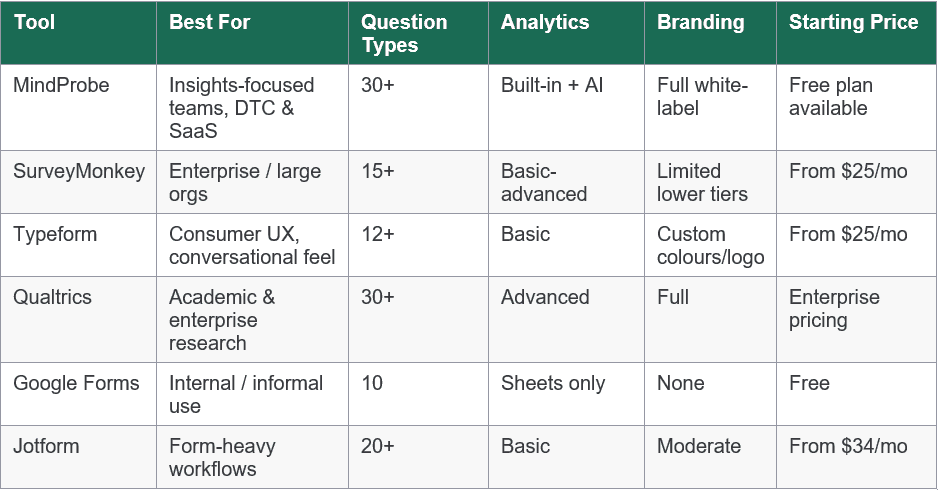
Note: This comparison reflects publicly available information as of 2026. Pricing and features change frequently - verify directly with each vendor before making a purchase decision.
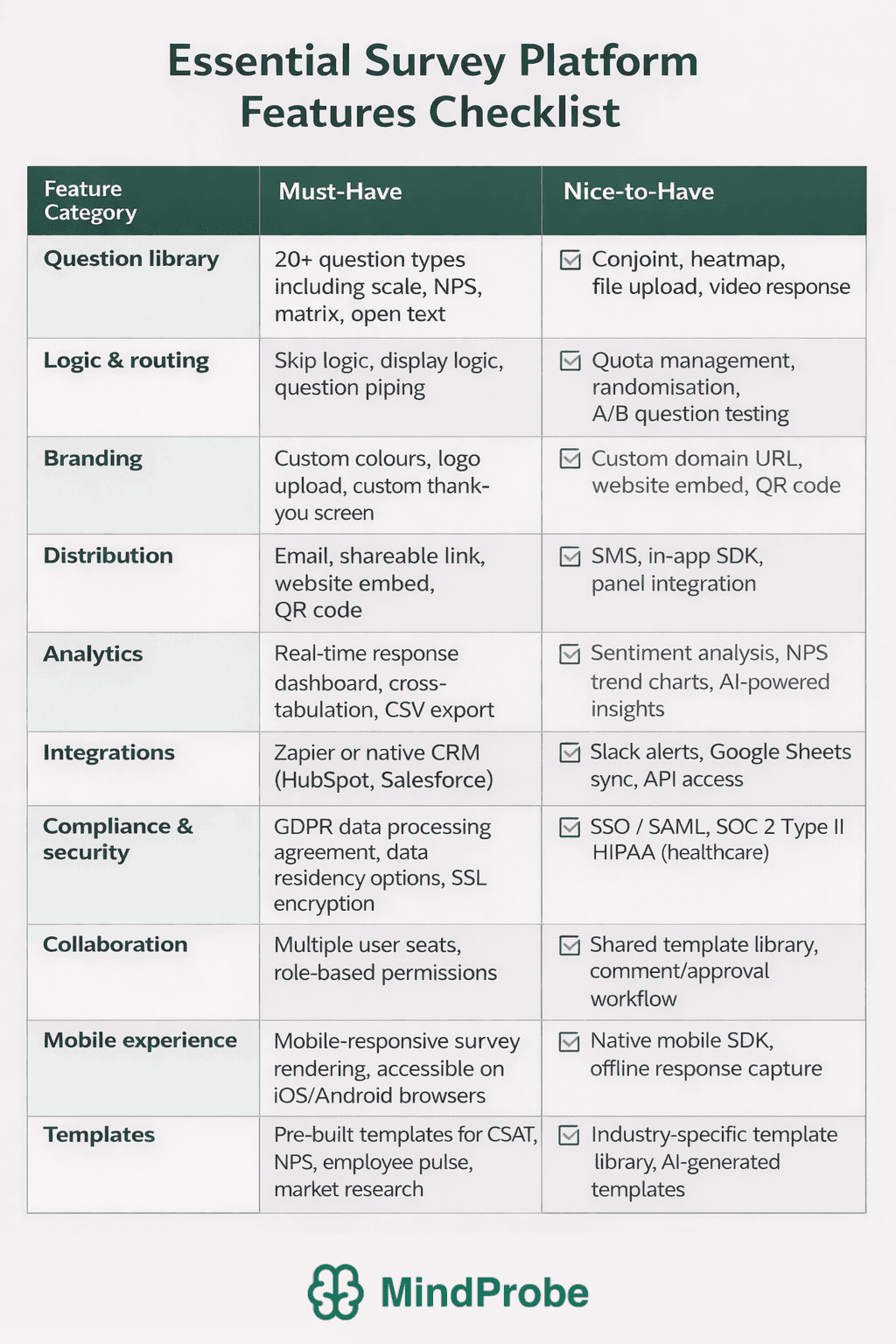
16. Survey Software Feature Checklist
Use this checklist when evaluating any survey platform. It is structured into must-have capabilities - the features a platform needs to support a professional survey programme - and nice-to-have capabilities that differentiate platforms at the higher end of the market.
Print or copy this checklist and score each platform you're evaluating. Any platform that fails to deliver the must-have column across all categories should be disqualified regardless of price.
Red flags to watch for when evaluating survey platforms
• Response or survey caps on 'free' plans that make the tool unusable for real research - check the exact limits, not just the headline.
• No GDPR data processing agreement or data residency options - a compliance risk for any organisation operating in the EU or UK.
• Platform branding on survey links and pages that can't be removed without paying for a top-tier plan - this affects response rates and brand perception.
• No skip logic on lower-tier plans - a survey tool without skip logic is a form builder, not a survey platform.
• Export-only analytics - if every analysis requires a CSV download and a pivot table, the workflow will create bottlenecks and limit the speed of insight.
• No pilot test or preview functionality - you should be able to test the respondent experience before publishing, at any plan level.
Ready to build surveys that actually drive decisions?
MindProbe gives marketing, CX, and research teams 30+ question types, full branding, skip logic, multi-channel distribution, and built-in analytics - in one platform, starting free.
17. Frequently Asked Questions
How do I create a free online survey?
Most major platforms - including MindProbe - offer a free plan that requires no credit card. Sign up, choose a template or start from scratch, add your questions using the question builder, configure any skip logic, and share via link, embed, or email. MindProbe's free plan includes access to 30+ question types, basic logic, and real-time analytics. Check the response and survey limits on any free plan before launching a high-volume campaign - limits vary significantly between platforms. Start free at mindprobe.ai.
What is a good response rate for an online survey?
It depends on channel and relationship. Internal employee surveys typically achieve 30-60%. Customer email surveys to an opted-in list average 20-30%. Cold outreach surveys often achieve single-digit rates. SurveyMonkey's benchmark research places 20-30% as a reasonable baseline for email surveys to existing customers. Rather than chasing a percentage, focus on whether your sample is large enough for your intended analysis - a 10% rate from 10,000 sends gives you 1,000 responses, which is ample for most commercial research. What matters more than rate is representativeness: are the people who responded similar in key characteristics to those who didn't? Glossary: response rate.
How long should a survey be?
As short as possible, as long as necessary. Transactional surveys (post-purchase CSAT, post-support NPS) should be 1-3 questions. Pulse surveys work at 5-10 questions. Full market research or brand tracking surveys can justify 20-30 items if every question is essential and skip logic minimises individual burden. Aim for under 10 minutes for all but specialist research contexts. If you're finding it impossible to get below 15 minutes, you are almost certainly trying to answer too many research questions in a single survey - split it into two separate instruments.
What question types should I use?
Use rating scales for attitudinal measures you want to track over time. Use multiple choice for categorical classification. Use open text sparingly - one or two per survey - for verbatim context and examples. Use ranking when respondents need to prioritise among a defined list. Use NPS for loyalty and advocacy measurement. Avoid using only one question type throughout - variety reduces fatigue and keeps the respondent experience engaging. For a full taxonomy with guidance on when to use each format, see our Survey Question Types: The Complete Guide.
How do I improve survey response rates?
The five factors with the strongest documented impact are: (1) a recognisable, trusted sender name; (2) a subject line or intro that clearly states purpose and estimated completion time; (3) a short, logically routed survey that uses skip logic to show only relevant questions; (4) correct timing (Tuesday-Thursday mornings for B2B email; within 24 hours of the event for transactional surveys); (5) a single follow-up reminder to non-respondents after 3-5 days. Incentives can help but are not a substitute for good survey design and a trusted sender relationship. For a 14-point guide, read How to Improve Survey Response Rates: 14 Proven Tactics.
What is the difference between a survey and a questionnaire?
A questionnaire is the instrument - the set of questions. A survey is the broader process: it includes the questionnaire but also the sampling strategy, administration method, data collection, and analysis. Every survey uses a questionnaire, but not every questionnaire is part of a survey. For a full comparison, see our dedicated article on survey vs questionnaire.
Sources & Further Reading